Green Screen Studio in Abu Dhabi:How to Plan a Shoot That Keys Cleanly
What a green screen studio is for, what makes the difference between a clean key and days of fixing in the edit, and how to plan the light, the wardrobe, the camera and the background before you book one in Abu Dhabi.
A green screen studio in Abu Dhabi lets you put a presenter, a product or a whole conversation in front of any background, added later in the edit. It works when the screen is lit evenly, the subject stands well clear of it, and the shoot is planned around the background before anyone arrives. Get those right and the key takes minutes; get them wrong and the edit takes days.
This guide covers when green screen is the right choice, the details that decide a clean key, and what to ask a studio before you book. For choosing a studio in general, see the ten checks for choosing a photo studio in Abu Dhabi.
What a green screen is, and why it is green
Green screen, or chroma key, replaces one colour in the picture with another image. The editing software picks out the green, makes it transparent, and the new background shows through. Green is used because it is far from every skin tone, and because digital camera sensors record more green detail than red or blue, so it pulls away from the subject cleanly. Blue screen does the same job, and is still used when someone has to wear green.
When green screen is the right choice
Green screen or a real set?
Choose green screen when
Choose a real set when
The background is a graphic, a chart or a screen recording
The background is a real place the viewer should trust
The location is impossible, expensive or far away
You can shoot there, or build it, for the same cost
A series needs the same set for every episode
Each video needs its own look
You will choose or change the background after the shoot
The background is fixed and known
Presenters, explainers, composites and product overlays
Interviews and conversations, where a real room feels natural
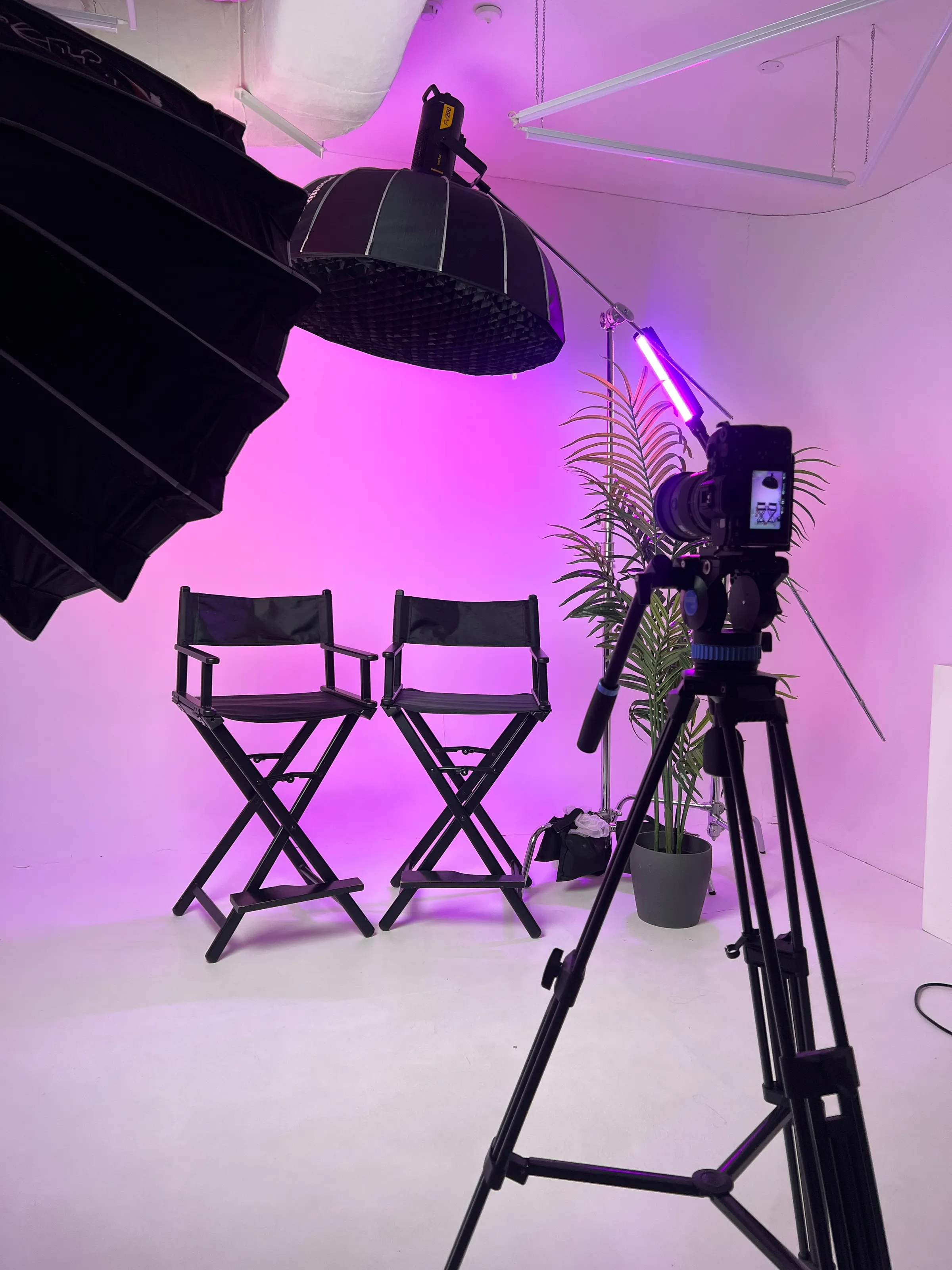
For conversations, a real set: the interview set beside the green screen at Evo's studio.
Interviews and conversations usually look better on a real set, with depth and light behind the people. That is why Evo's studio has an interview set beside its green screen: two director's chairs facing a cinema camera under coloured light. Green screen earns its place for presenters, explainers and composites, and for anything where the background is information rather than a room.
What makes a clean key
Every keying problem has a cause on set, and most come down to five things.
Even light on the screen
The screen should be one flat, even green from edge to edge, with no bright hot spots and no dark corners. Light it on its own, from both sides, before you light the subject. Creases and seams in fabric make shadows, so a painted wall or a tight, smooth cloth keys better than a loose one.
Distance between the subject and the screen
Green light bouncing off the screen lands on the subject's hair, shoulders and edges. That green spill is what makes outlines look ragged or tinted. Keep the subject well forward of the screen, a few metres where the room allows, and the spill falls away and the shadow drops behind them, out of the frame.
Separate light on the subject
Light the person or the product for the background they will be placed in, not for the green. A light from behind, on the hair and shoulders, draws a clean edge against the screen and cancels some of the spill. If the background is a sunset, the key light should come from the sunset's side.
Light the subject for the background it will join, not for the screen. Lighting at Evo's studio, Abu Dhabi.
The floor, if the feet are in shot
A full-length shot needs green on the floor as well as the wall, with the join between them lit so it disappears. If the feet are not in shot, frame from the waist or the knees up and the floor stops mattering. Evo's green screen is a full green floor and wall, lit evenly from both sides, so the key is clean and any background can go behind it.
A sharp, clean picture
Motion blur and heavy compression both soften edges, and soft edges key badly. Use a faster shutter speed if the subject moves a lot, record at the highest quality the camera offers, and keep the focus on the subject. Fine detail such as flyaway hair is the hardest thing to key, so tidy it before the take.
How to plan the background before the shoot
The most expensive green screen mistake is shooting first and choosing the background afterwards. The person has to look as if they belong in the picture behind them, and that is decided on set.
01Choose or design the background first, at least roughly, and bring it to the shoot on a laptop.
02Match the camera height and angle to the background's. A background shot from eye level needs a subject shot from eye level.
03Match the light's direction and colour: warm or cool, soft or hard, from the left or the right.
04Match the focus. A soft background behind a sharp subject looks natural; a sharp background behind a soft subject does not.
05Mark the floor where the subject stands, so every take sits in the same place in the frame.
06Leave room in the frame for graphics, captions or a product that will be added later.
Monitor
Camera
Check the frame on a monitor, not the camera's own screen, and set the camera height to match the background before the first take. Evo studio, Abu Dhabi.
What to wear on a green screen
No green, including green jewellery, green logos and anything with green in a print. It disappears with the screen.
Nothing shiny or reflective: sequins, metallic fabrics and glossy jewellery pick up green and key badly.
No very fine patterns, such as narrow stripes and small checks, which shimmer on video.
Solid, mid-tone colours key best. White and very pale clothes, including a white kandura, reflect green spill, so tell the studio in advance and it can be lit for.
Tidy hair, with flyaways smoothed down. Loose strands are the hardest thing to key.
A second outfit, in case the first turns out to have green in it.
What a green screen booking involves
A green screen day is two jobs: the shoot and the composite. Ask a studio which of them it does. Some rent the screen and the room, and you light, shoot and key it yourself or with your editor. Others light, shoot, key and edit, which takes longer to quote but leaves you with finished video. Compare the total for the finished minutes you need, not the hourly rate for the room; photo studio rental in Abu Dhabi explains what a rate usually covers.
Green screen problems and how to avoid them
Common green screen problems, their cause and the fix on set
Problem
Usual cause
Fix on set
Green edges around hair and shoulders
Spill from a screen too close behind
Move the subject forward; add a back light
Patches of the screen will not key
Uneven light, shadows or creases
Light the screen on its own and smooth the fabric
Parts of the subject vanish
Green or reflective clothing
Change the outfit, or the screen colour
Ragged edges on movement
Motion blur or heavy compression
A faster shutter and the highest-quality recording
The subject looks pasted on
Light, angle or focus that does not match the background
Plan the background first and match it on set
What your editor needs from the shoot
Whoever keys the footage will thank you for a few minutes spent on these before the set comes down:
A clean plate: a few seconds of the empty, lit screen in the same frame as each shot, which helps the software separate the subject from the green.
The background plates, at the same size and frame rate as the footage, or the designs they will be made from.
Notes on the set-up: the lens, the camera height and the direction of the key light, for anyone building the background later.
The best-quality files the camera recorded, not a compressed copy for review.
A clear name for every take, with the good ones marked, so nobody keys the wrong one.
Questions to ask a green screen studio
Does the screen cover the floor as well as the wall?
How is the screen lit, and is it lit separately from the subject?
How far forward of the screen can the subject stand?
Who keys and composites the footage, and is it in the quote?
Can we see something keyed from this screen?
What do we leave with: the raw footage, the keyed footage or the finished video?
Green screen at Evo's studio
Evo's studio in Al Nahyan, Abu Dhabi has a green screen standing alongside a white cyclorama, an interview set and a coloured-light set, so a presenter can move from the green screen to the interview chairs in one booking. Hire the room for your own crew, or book our team to shoot it and our editors to key it.
Yes. Evo Media Pro's studio in Al Nahyan, Abu Dhabi has a green screen over the floor and the wall, lit evenly from both sides, which you can hire for your own crew or book with Evo's team.
Why are green screens green?
Green is far from every skin tone, and digital camera sensors record more green detail than red or blue, so it pulls away from the subject cleanly. Blue screen does the same job when someone has to wear green.
What should you not wear on a green screen?
Anything green, anything shiny or reflective, and very fine patterns such as narrow stripes and small checks. Solid, mid-tone colours key best.
How far should you stand from a green screen?
Well forward of it, a few metres where the room allows, so green light bouncing off the screen does not spill onto the hair and shoulders and the shadow falls out of the frame.
Do I need the background ready before a green screen shoot?
Yes, at least roughly. The camera height, the angle, the focus and the direction and colour of the light all have to match the background, and that is decided on set.
Written by
Muluh Kevin
Performance Marketing Manager, Evo Media Pro
Muluh Kevin is a performance marketer and growth strategist who turns digital attention into business opportunity. With a bachelor’s degree and postgraduate diploma in digital marketing and e-commerce, he blends data-driven advertising, creative strategy, and conversion-focused thinking to help brands stand out, attract the right customers, and grow with purpose.
From building campaigns across Meta and Google to uncovering new opportunities through SEO and analytics, Kevin approaches marketing with one guiding principle: every click should have a purpose, and every strategy should move the business forward.






Comments
No comments yet. Yours could be the first.